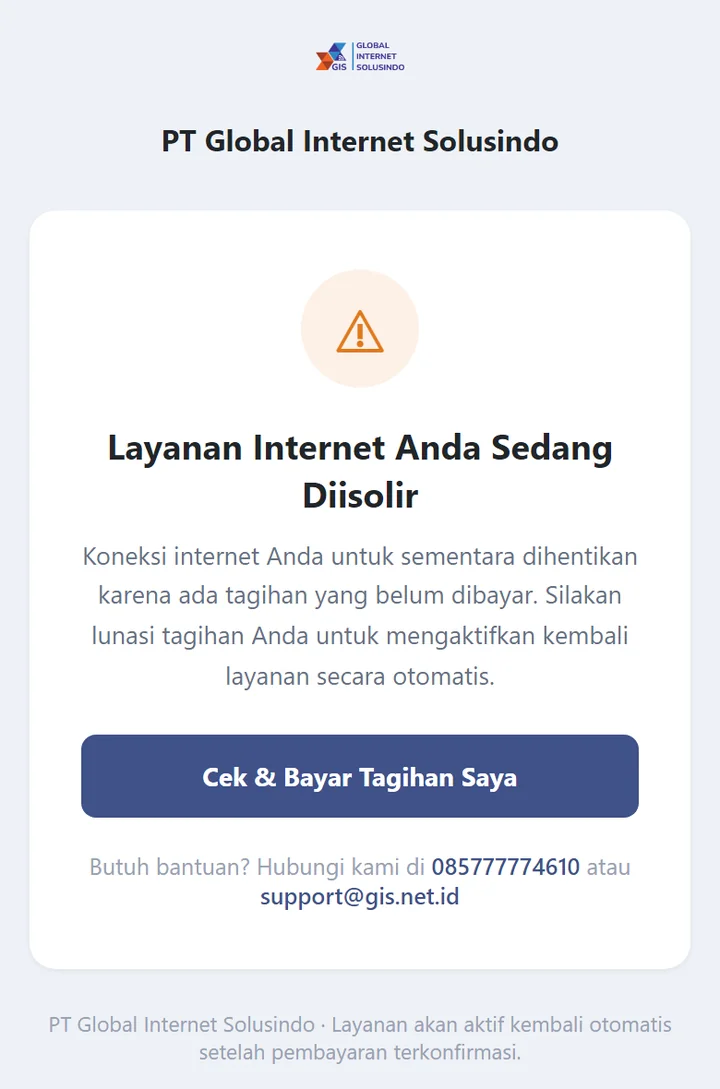
Suddenly the internet at home can't be used, and every time you open a website the page "Layanan Internet Anda Sedang Diisolir" (Your Internet Service Is Being Isolated) appears? Don't worry. This isn't a network outage, and your internet can be back up quickly.
The images in this article use a sample customer account.
What Is Isolation?
Isolation (isolir) is a temporary suspension of internet service because of an unpaid bill after the grace period following the due date has passed. Your data and account remain safe, and the service is not permanently disconnected. As soon as the bill is paid, the internet is restored.
Before the due date, GISNET sends bill reminders via WhatsApp. Your bills can also always be viewed in the Tagihan (Bills) menu in the Customer Portal. If your service is isolated, you will also receive a notification via WhatsApp.
Signs Your Internet Is Isolated
- Every website opened from your home network is redirected to the Layanan Internet Anda Sedang Diisolir (Your Internet Service Is Being Isolated) page.
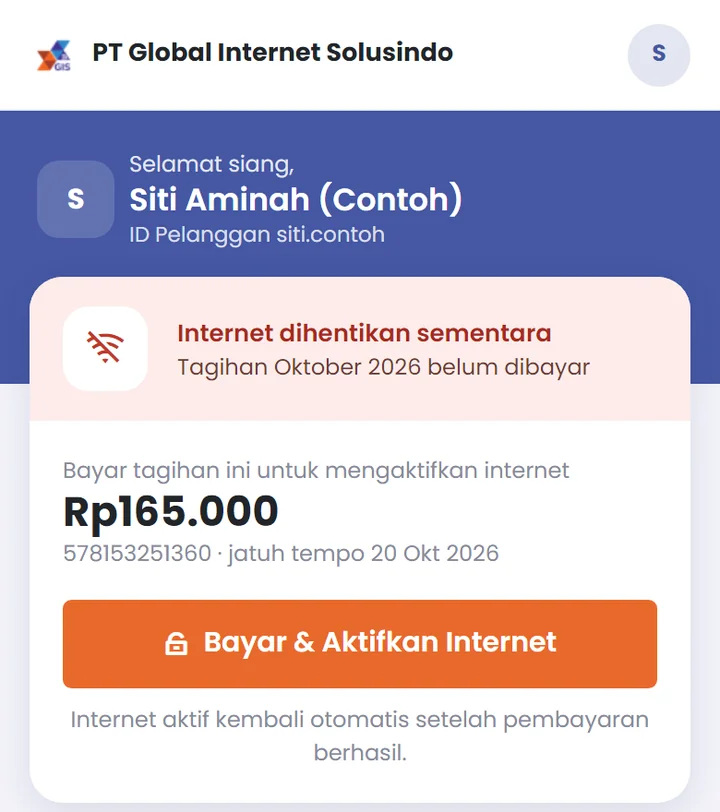
- In the Customer Portal, the Home screen shows the status Internet dihentikan sementara (Internet temporarily suspended) along with the bills that need to be paid.
How to Reactivate Your Internet
Option 1: From the isolation page
Tap the Cek & Bayar Tagihan Saya (Check & Pay My Bill) button. You will be taken to pay.gis.net.id. Enter your Customer ID, open your bill, then pay online via QRIS, e-wallet, or bank Virtual Account.
Want to ask something first? Tap Chat CS via WhatsApp on the same page. If WhatsApp doesn't open, turn off WiFi and use mobile data.
Option 2: From the Customer Portal
Log in to my.gis.net.id. On the Home screen, tap the Bayar & Aktifkan Internet (Pay & Activate Internet) button and complete the payment.
The complete payment steps, with pictures, are in the article how to pay your GISNET bill online.
How Long Until the Internet Is Back?
- Online payment (QRIS, e-wallet, Virtual Account): the internet is reactivated automatically once the payment has been recorded, usually within minutes, with no need to send proof.
- Regular bank transfer: send proof of transfer to our admin via WhatsApp at 0857-0629-9235. The payment is confirmed manually by the admin, so the internet is reactivated after confirmation.
Already paid but the internet still isn't normal after a few minutes? Turn off the router, wait about 10 seconds, then turn it back on. If there's still a problem, contact our support team.
Tips to Avoid Isolation
- Pay before the due date. Watch for bill reminder messages from GISNET on WhatsApp.
- Make sure your registered WhatsApp number is still active, so you don't miss reminders. You can check the number in the Akun (Account) menu in the portal.
- Check the Tagihan (Bills) menu in the portal regularly.
- Having trouble paying? Contact our team before the due date via WhatsApp at 0857-0629-9235.
Isolation does not affect your plan, customer number, or WiFi settings. Everything goes back to normal once the bill is paid.